
What Is PaaS? Platform as a Service vs IaaS, SaaS and Kubernetes
 Niklas KarolyFounder Nodion
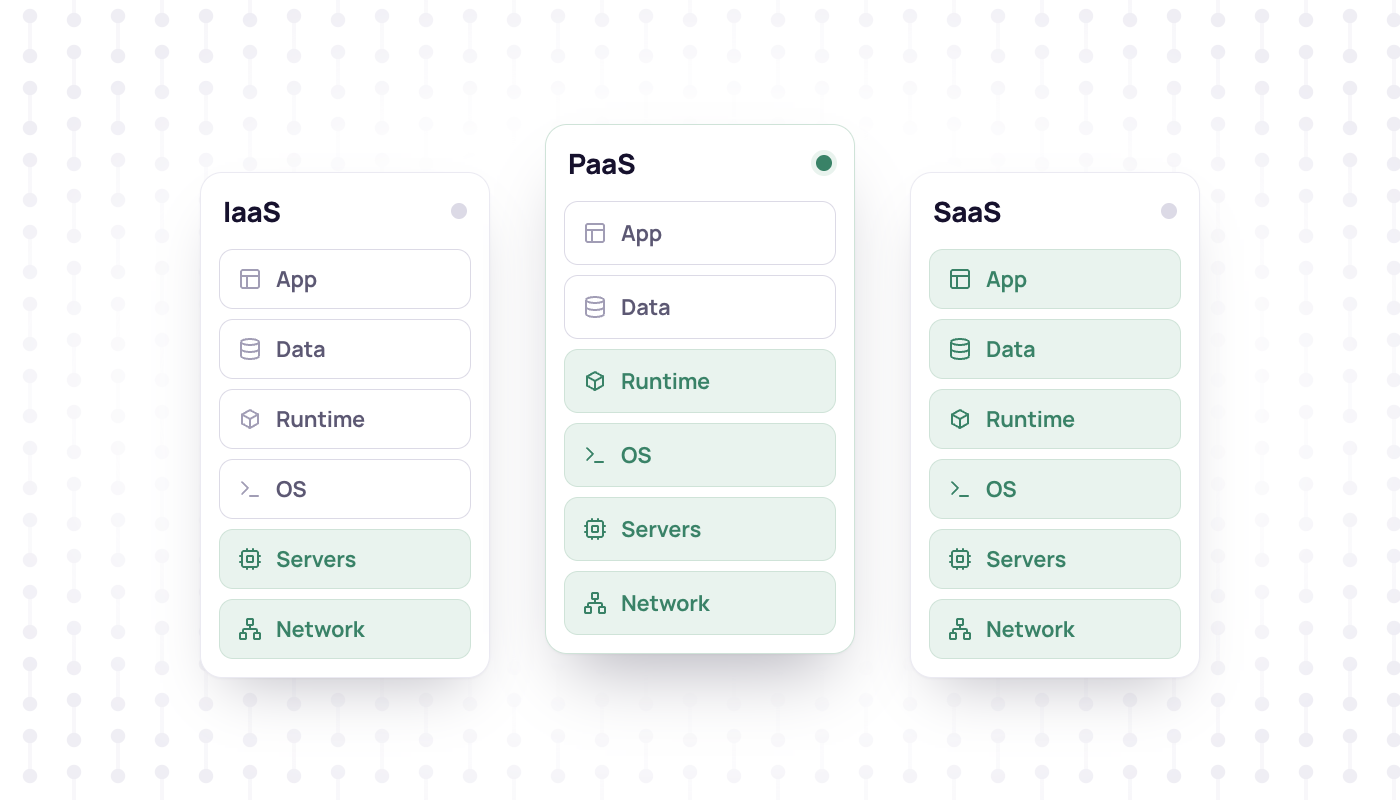
In short
- Platform as a Service (PaaS) is a cloud model in which you deploy source code or a container image and the provider runs the servers, operating systems, builds, deploys and scaling.
- You keep responsibility for your code, configuration, secrets and data, and for choosing sizes and regions.
- Compared with IaaS you manage less, compared with SaaS you still ship your own software, and unlike Kubernetes many PaaS platforms build your source code for you, while most also deploy a container image you supply.
- To avoid lock-in, pick a PaaS that builds standard container images from a Dockerfile or Cloud Native Buildpacks and runs standard database engines.
Platform as a Service (PaaS) is a cloud model in which you hand over your application, as source code or a container image, and the provider runs it. The platform builds it, deploys it, scales it and operates the servers, operating systems and networks underneath. You stay in charge of the application, its configuration and its data.
The most cited definition comes from the US National Institute of Standards and Technology (NIST SP 800-145). With a PaaS, you deploy your own applications onto the provider's infrastructure, but you do "not manage or control the underlying cloud infrastructure including network, servers, operating systems, or storage". You do control the deployed applications and, possibly, settings for the hosting environment.
What a PaaS takes over
The exact list differs by provider, but a full PaaS covers most of this:
- Builds: it turns a Git repository into a runnable image, either with buildpacks that detect your language or from a Dockerfile you commit.
- Deploys: it rolls out new releases, often on every push to a branch, and keeps a history of what ran when.
- Scaling: more replicas or a larger size is a setting, not a new server to install.
- TLS and domains: every app gets a hostname, and certificates for your own domains are issued and renewed for you.
- Logs and metrics: runtime logs and CPU and memory charts without running your own logging stack.
- Managed databases: PostgreSQL, MySQL or a cache next to the app, with replicas and backups as options.
- Servers and operating systems: patching hosts, replacing failed hardware and keeping the network up.
What stays with you
A PaaS removes the infrastructure work, not the responsibility for your product. You still own:
- Your code and its dependencies, including updating libraries when a vulnerability comes out.
- Configuration and secrets: environment variables, API keys and who on your team can see them.
- Your data: the schema, migrations, turning on backups and testing a restore.
- Sizing and cost: how many replicas you run and which plan, and the bill that follows.
- Application security: authentication, input validation and access to the dashboard.
- Location: which region your app and its data run in.
PaaS vs IaaS vs SaaS vs serverless vs Kubernetes
The models differ in what you hand over and what you keep. A rough comparison:
| Model | You bring | The provider runs | You still manage | Typical fit |
|---|---|---|---|---|
| IaaS | Virtual machines, disks, networks | Hardware, virtualization, data centers | Operating system, runtime, deploys, scaling, patches | Full control, legacy or special software |
| PaaS | Source code or a container image | Servers, OS, builds, deploys, routing, often databases | Application, configuration, data | Web apps, APIs, workers |
| SaaS | Nothing to deploy | The whole application | Settings, users and your data in the app | Standard business software |
| Serverless (FaaS) | Functions | Execution per event or request, scaling with demand | Function code, cold starts, time and size limits | Event-driven, spiky workloads |
| Kubernetes | Container images and manifests | As a managed service: the control plane | Nodes, deployments, ingress, scaling setup, CI/CD, logging | Large setups with a platform team |
IaaS gives you virtual machines and leaves the rest to you. NIST describes it as provisioning "processing, storage, networks, and other fundamental computing resources" on which you run arbitrary software, including the operating system.
SaaS is the other end: you use the provider's finished application in the browser or over an API and deploy nothing.
Serverless in the function sense runs your code as small functions triggered by events or HTTP requests and bills by actual demand. The CNCF's serverless whitepaper notes that most runtimes limit the size or execution time of each function, and that start-up after idle periods can be slow. A PaaS usually runs your app as an always-on process instead.
Kubernetes is a container orchestrator, and its own documentation says it "is not a traditional, all-inclusive PaaS". It does not deploy source code, does not build your application and does not include databases as built-in services. It provides building blocks for platforms. Read PaaS vs Kubernetes for the longer comparison.
When a PaaS fits
- You build web apps, APIs or background workers in a common language.
- Your team has no one whose job is to run servers or clusters, and you would rather not hire for it yet.
- You want a new version live a few minutes after a merge, with logs and metrics already in place.
- You need databases, storage and the app in one place, under one bill.
When it does not
- You need a custom kernel, special hardware or low-level control over the network. A virtual machine or bare metal fits better.
- Your software expects root access, a full init system or packages installed with maintainer scripts. A Dockerfile can cover some of this; some software only runs well on a VM.
- You run large, steady workloads and already have a platform team. Running your own infrastructure can pay off at that point.
- Your code runs a few seconds a day in response to events. A function platform can be cheaper.
- You have a legal or compliance requirement that the provider's regions or certifications cannot meet.
How to evaluate a PaaS
Regions and data location
Check where the app, the database, backups and logs actually run, and whether you choose that per service. Also check where the provider's control plane and account data live, and which country the company is based in. For personal data of people in the EU, both questions matter.
Included services
Look at what comes with the platform and what needs a third party: databases, object storage, email, CDN, logs and metrics, preview environments. Every add-on from another vendor is one more contract, one more bill and one more sub-processor.
Pricing model
Platforms bill per instance, per second of runtime, per request or per seat, and some meter bandwidth, build minutes or log volume on top. Estimate a month with your real numbers, including the database and a second environment for staging.
Portability
Lock-in usually hides in the build and the configuration, not in the code. Prefer a platform that builds standard container images from a Dockerfile or from Cloud Native Buildpacks: the buildpacks lifecycle exports an OCI image, the same format other container platforms run. Keep configuration in environment variables, and use standard database engines that you can dump and restore elsewhere. Then moving away is a migration, not a rewrite.
Where Nodion fits
Nodion is a PaaS run by Nodion GmbH from Stuttgart, Germany. You deploy from Git with a Dockerfile or Nodion's own Cloud Native Buildpacks, or from a prebuilt image. Every app gets processes, logs, metrics and domains, Git apps can open preview environments, and managed Postgres, MySQL, Valkey and ClickHouse attach on the app's Environment tab. You pick the region per service, for example EU Central in Frankfurt. See Applications for the details.
Frequently asked questions
What is PaaS in simple terms?
A PaaS is a platform that runs your application for you. You push code or a container image, and the provider builds, deploys and scales it on servers it manages, so you never install or patch an operating system.
What is the difference between IaaS, PaaS and SaaS?
With IaaS you rent virtual machines and manage everything from the operating system up. With PaaS you only manage your application and its data. With SaaS you use a finished application and deploy nothing.
Is Kubernetes a PaaS?
No. The Kubernetes documentation says it is not a traditional, all-inclusive PaaS: it does not build or deploy source code and has no built-in databases. It provides building blocks that platforms can be built on.
How do I avoid vendor lock-in with a PaaS?
Choose a platform that builds standard container images from a Dockerfile or Cloud Native Buildpacks, keep configuration in environment variables and use standard database engines such as PostgreSQL or MySQL that you can dump and restore elsewhere.