
Preview Environments Explained: A Fresh Copy of Your App for Every Pull Request
 Niklas KarolyFounder Nodion
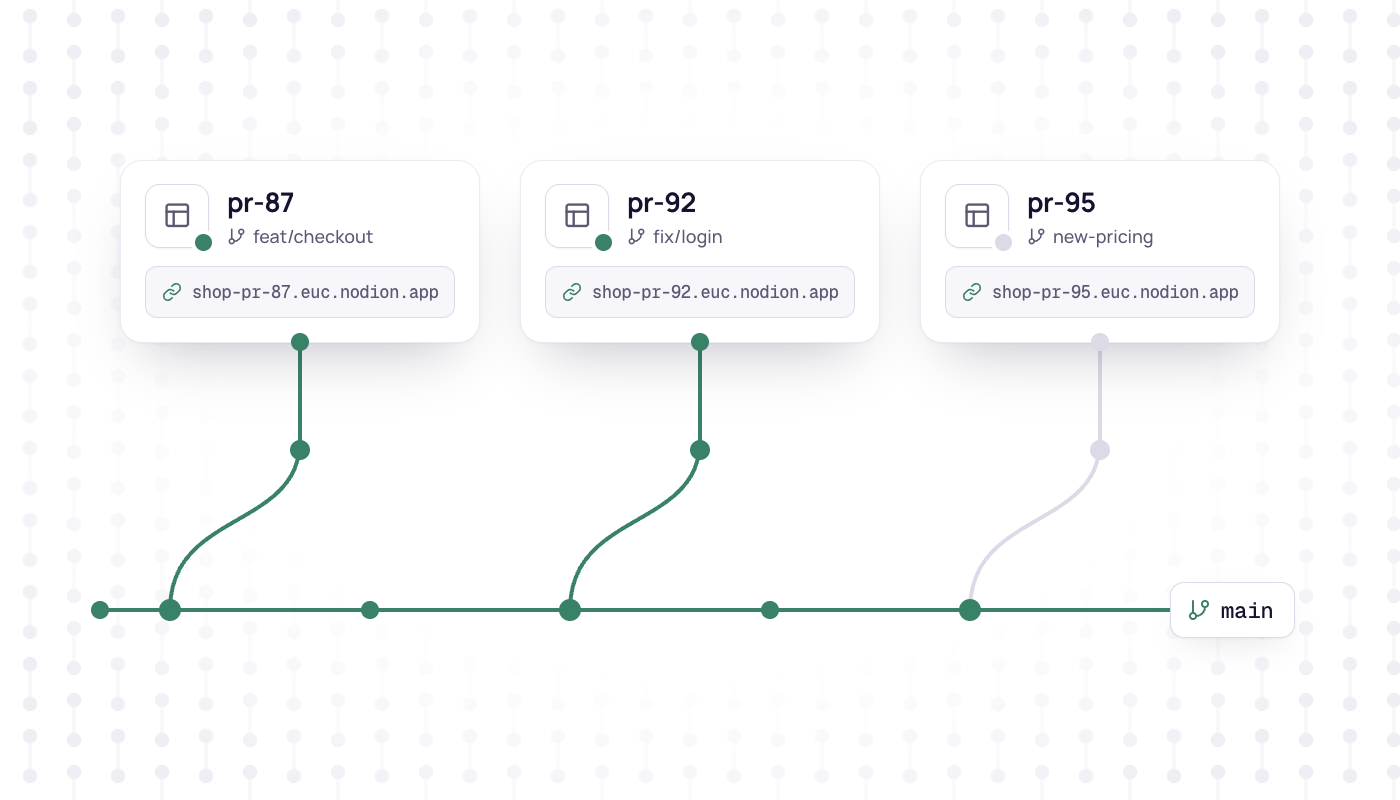
In short
- A preview environment is a short-lived copy of an application, built from a pull request or branch and running at its own URL.
- Teams use previews to review running software, test each change in isolation, show work to stakeholders and test database migrations before they reach production.
- The hard parts are databases, secrets, callback URLs, cost and cleanup, not the build itself.
- On Nodion, Git apps can turn on previews: each one gets its own URL and fresh copies of any databases attached to the app instead of production data, and previews expire on their own; see the applications docs.
A preview environment is a short-lived copy of your application, built from a pull request or branch and running at its own URL. Reviewers open a link and try the change in a browser instead of reading a diff. When the work is done, the environment goes away.
This guide covers what preview environments are good for, what makes them tricky to run and how they work on Nodion.
What is a preview environment?
Think of it as a temporary staging environment for one change. Every pull request, or a branch you pick, gets:
- its own build of the code on that branch,
- its own running app with its own URL,
- its own copies of the services it depends on, usually at least a fresh database,
- a limited lifetime.
The difference to a classic shared staging server: nobody waits for staging to be free, and one half-finished feature cannot break the test of another. You will also see the terms review apps, deploy previews or ephemeral environments for the same idea.
Why teams use them
- Review running software, not only code. A broken layout, a confusing flow or a slow page is obvious in the browser and easy to miss in a diff.
- QA per change. Testers check one change in isolation before it is merged, so every bug they find belongs to exactly one pull request.
- Stakeholders without a dev setup. Designers, product managers or a customer open a link. No local checkout, no screen sharing.
- Testing migrations. A schema migration has to run against a real database before the preview works. A migration that only works on one laptop fails here, not in production.
- Parallel work. Five open pull requests mean five previews instead of a queue in front of one staging server.
What makes them hard
Building the app is the easy part. The hard parts are everything around it.
Databases
An app without data is hard to review, so most previews need a database. There are three common choices: an empty database, an empty database plus seed data, or a copy of production. Copying production is tempting, but it puts real customer data, including personal data, into many short-lived environments that more people can open. It is also slow once the database is large. For most teams, an empty database with a seed script for realistic demo data is the safer default.
Secrets
A preview runs code that is not reviewed yet. Production credentials do not belong there. Give previews test or sandbox keys for payment providers, email and third-party APIs, so a bug in a branch cannot charge a real card or email real customers.
URLs and callbacks
Each preview has a different hostname. OAuth redirect URLs, webhook endpoints, CORS rules and cookies tied to your production domain can break. Apps that read their own base URL from configuration, instead of hardcoding the production domain, have far fewer problems here.
Cost and cleanup
Every open preview runs an app, plus a fresh database for each database attached to the parent app. Ten open pull requests can mean ten extra environments, and a forgotten preview keeps running until someone closes it. Cleanup has to happen without anyone thinking about it, which is why previews should expire on their own.
How preview environments work on Nodion
On Nodion, previews are part of every application that deploys from a Git repository:
- Turn them on in the app's Settings.
- One preview per pull request or branch. Each preview is an ephemeral app with its own URL.
- By hand or automatic. Create a preview by hand, or let Nodion create one automatically for pull requests.
- A fresh database. For each database attached to the app, a preview gets its own empty database, never a clone of your production data. Volumes, buckets and email zones are not copied.
- The app's settings come along. A preview starts with a copy of the app's environment variables, secrets included. The variables of attached databases point to the preview's fresh databases; everything else, including keys and URLs of other services, is copied as is, so review it. Nodion adds
NODION_PREVIEW=1,NODION_PR_NUMBER,NODION_BRANCHandNODION_PARENT_APP. - Previews expire after a number of days without a deploy (7 by default, set in the app's settings). Until then, you can redeploy or close each one from the app's Previews tab.
- Git apps only. Apps deployed from a prebuilt image do not have previews.
The fresh database is a deliberate choice: attached preview databases start empty, so they hold no production data. Review the copied keys and URLs as well, so preview code cannot reach production systems through them. The flip side is that your app has to start from an empty database, which is worth getting right anyway.
To get started, connect your repository under Git integrations, create the app from it and turn on previews in its settings. The details are in the applications docs.
A typical review loop
- A developer opens a pull request. With automatic previews on, a preview for it starts with its own URL and an empty database.
- The developer posts the preview link in the pull request. Reviewers, QA and the product owner try the change in the browser.
- Feedback turns into new commits. Redeploy the preview from the Previews tab to put the latest code in front of the reviewers.
- Once the change is approved and merged, close the preview, or let it expire on its own.
Nobody had to ask for a staging slot, and Nodion replaced the attached database with a fresh one. Review all other copied keys and URLs before you run preview code, because they still point wherever the app's settings point.
Make your app preview-ready
- Run migrations automatically when the app deploys or starts, so a fresh database gets the current schema without manual steps.
- Add a seed script that creates a test login and some demo content. Reviewers should see something useful on the first click.
- Read the base URL from an environment variable instead of hardcoding your production domain.
- Switch side effects to test mode when
NODION_PREVIEWis set: payments, emails and anything that writes to other systems. Previews inherit the app's secrets, so without that check a preview uses your production keys. - Keep pull requests small. A preview for one focused change is much easier to review than one for a week of work.
When you can skip them
For a solo project with a few changes a week, a local setup plus production may be enough. Previews pay off as soon as more than one person reviews, tests or signs off on changes, or when database migrations are part of your regular work.
Previews come with every Git app on Nodion, alongside processes, logs, metrics and auto-deploy. See Applications for the full picture.
Frequently asked questions
What is a preview environment?
A temporary deployment of your application for one pull request or branch, with its own URL and, on Nodion, fresh copies of the databases attached to the app. Reviewers use it to try a change before it is merged, and it is removed when the work is done.
What is the difference between a preview environment and staging?
Staging is usually one shared, long-lived environment that changes take turns on. Preview environments are created per pull request or branch, run in parallel and expire, so one change cannot block or break the test of another.
Should a preview environment use a copy of the production database?
Usually not. A copy puts real customer data into short-lived environments that run unreviewed code. An empty database with migrations and a seed script is safer, and on Nodion a preview's database is always fresh, never a clone of production.
Does Nodion support preview environments?
Yes, for apps deployed from Git. Turn previews on in the app's settings, then create one by hand or automatically for pull requests. Each preview gets its own URL and fresh copies of any databases attached to the app, and previews expire on their own.